Raster basics
Opening a raster file
import geoutils as gu

# Fetch an example file
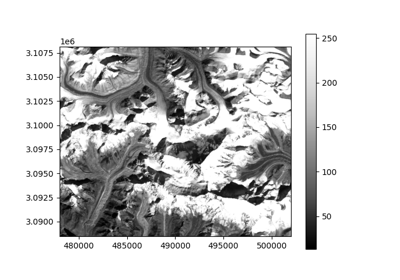
filename = gu.datasets.get_path("landsat_B4")

# Open the file
image = gu.Raster(filename)
Basic information about a Raster
To print information directly to your console:
print(image)
Driver:               GTiff
Opened from file:     /home/docs/checkouts/readthedocs.org/user_builds/geoutils-erikm/envs/docs-backend/lib/python3.7/site-packages/geoutils/datasets/LE71400412000304SGS00_B4_crop.TIF
Filename:             /home/docs/checkouts/readthedocs.org/user_builds/geoutils-erikm/envs/docs-backend/lib/python3.7/site-packages/geoutils/datasets/LE71400412000304SGS00_B4_crop.TIF
Raster modified since disk load?  False
Size:                 800, 655
Number of bands:      1
Data types:           ('uint8',)
Coordinate System:    EPSG:32645
NoData Value:         None
Pixel Size:           30.0, 30.0
Upper Left Corner:    478000.0, 3088490.0
Lower Right Corner:   502000.0, 3108140.0
If you’d like to retrieve a string of information about the raster to be saved to a variable, output to a text file etc:
information = image.info()
With added stats:
information = image.info(stats=True)
Then to write a file:
with open("file.txt", "w") as fh:
    fh.writelines(information)
Or just print nicely to console:
print(information)
Driver:               GTiff
Opened from file:     /home/docs/checkouts/readthedocs.org/user_builds/geoutils-erikm/envs/docs-backend/lib/python3.7/site-packages/geoutils/datasets/LE71400412000304SGS00_B4_crop.TIF
Filename:             /home/docs/checkouts/readthedocs.org/user_builds/geoutils-erikm/envs/docs-backend/lib/python3.7/site-packages/geoutils/datasets/LE71400412000304SGS00_B4_crop.TIF
Raster modified since disk load?  False
Size:                 800, 655
Number of bands:      1
Data types:           ('uint8',)
Coordinate System:    EPSG:32645
NoData Value:         None
Pixel Size:           30.0, 30.0
Upper Left Corner:    478000.0, 3088490.0
Lower Right Corner:   502000.0, 3108140.0
[MAXIMUM]:          255.00
[MINIMUM]:          13.00
[MEDIAN]:           124.00
[MEAN]:             144.04
[STD DEV]:          79.44
Resampling a Raster to fit another
Comparing multiple rasters can often be a burden if multiple coordinate systems, bounding boxes, and resolutions are involved.
The geoutils.Raster class simplifies this using two methods: Raster.crop() and Raster.reproject().
Cropping a Raster
geoutils.Raster.crop()
If a large raster should be cropped to a smaller extent without changing the uncropped data, this is possible through the crop function.
large_image = gu.Raster(gu.datasets.get_path("landsat_B4"))

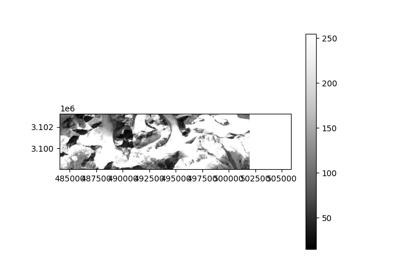
smaller_image = gu.Raster(gu.datasets.get_path("landsat_B4_crop"))
print(large_image.shape)

print(smaller_image.shape)
prints:
(655, 800)
(174, 726)
If we want to crop the larger image to fit the smaller one:
large_image.crop(smaller_image)
Now, they have the same shape, and can be compared directly:
print(large_image.shape)

print(smaller_image.shape)
prints:
(174, 598)
(174, 726)
Reprojecting a Raster
geoutils.Raster.reproject()
For rasters with different coordinate systems, resolutions or grids, reprojection is needed to fit one raster to another.
Raster.reproject() is apt for these use-cases:
large_image_reprojected = large_image.reproject(smaller_image)
This call will crop, project and resample the larger_raster to fit the smaller_raster exactly.
By default, Raster.resample() uses nearest neighbour resampling, which is good for fast reprojections, but may induce unintended artefacts when precision is important.
It is therefore recommended to choose the method that fits the purpose best, using the resampling= keyword argument:
resampling="nearest": Default. Performant but is not good for changes in resolution and grid.resampling="bilinear": Good when changes in resolution and grid are involved.resampling="cubic_spline": Often considered the best approach. Not as performant as simpler methods.
All valid resampling methods can be seen in the Rasterio documentation.